|
The holiday season is upon us and that means every industry
has pumped out more new tech than you can shake a stick at. Among the gadgetry
that has been released lies Nintendo's latest gaming console, the Wii U. The question
is: what're the actual capabilities of the Wii U? Is this truly the next
generation of gaming / entertainment /etc.? If I get my kid one of these, is
there anything it can do that I might enjoy? The answers to these questions get
lost within the marketing gimmicks and slanted reviews, so I'm here to give you
the first-hand view of what's going on.

Don't let Shigeru Miyamoto bully you into purchasing this
What is this tablet thing-a-majig?
 When first presented with the Wii U, I was perplexed. You've
got your "WiiMotes" from the original Wii and you have a tablet-esque GamePad,
all of which are connected to what looks to be a close clone of the original
Wii. The GamePad took some getting used to. For starters, it's significantly
larger than your typical controller, making it difficult to hang onto at first.
After some prolonged use of it, I managed to get the hang of it, but I'm wary
that the learning curve might be quite a bit steeper for others. The gist of
the typical gameplay is comprised of the primary player taking control of the GamePad,
while other players use the WiiMote. When first presented with the Wii U, I was perplexed. You've
got your "WiiMotes" from the original Wii and you have a tablet-esque GamePad,
all of which are connected to what looks to be a close clone of the original
Wii. The GamePad took some getting used to. For starters, it's significantly
larger than your typical controller, making it difficult to hang onto at first.
After some prolonged use of it, I managed to get the hang of it, but I'm wary
that the learning curve might be quite a bit steeper for others. The gist of
the typical gameplay is comprised of the primary player taking control of the GamePad,
while other players use the WiiMote.

There are quite a few control type options
The Wii U comes in two different flavors: white (the Basic
set) and black (the Deluxe set). Both sets come with the console, the Wii U GamePad,
and all the typical hookups needed. The deluxe model comes with a 32 GB
internal solid state drive, where the basic model has 8 GB. The memory for the
Wii U is used mostly for downloadable games and applications, so if you don't
plan on downloading a lot of games online, you can be safe with the 8GB flavor.
Both models have an SD card slot, an SDHC card slot, and 4 2.0 USB slots for
additional storage.
The Deluxe version comes with a copy of Nintendo Land (see
below for game information) and a "Digital Deluxe Promotion" which allows all
purchases made to refund "points" that can be used to get downloadable games.
For example, you buy a typical $59.99 game, so you get 599 points back which
translates to $5 back for the Nintendo online store. It's not much, but it's a
nice little gimmick.
The battery for both is the same, and only lasts (in my
experience) 2-5 hours depending on what is being done, whether it is games or
Netflix streaming. There are plug-and-play batteries
being developed that are allegedly enhancing the battery life to 10-20 hours,
but they are not currently released yet.
The 6.2" touch screen on the Wii U is resistive, not capacitive,
and comes with a stylus.
If you're not sure what that means, your typical smart phone/tablet utilizes a
capacitive touchscreen which requires a capacitive pointer, such as a bare
finger. A resistive touchscreen is touch sensitive, so it can be used wearing a
glove or with a stylus, etc.
The GamePad has a built-in, 9 axis motion sensor (3-axis accelerometer,
3-axis gyroscope and a 3-axis geomagnetic sensor), built-in speakers and
microphone, a front-facing camera, and an infrared transceiver.
So the gameplay, what
games are we talking about here?
Unfortunately, the Wii U was released with a limited
quantity of games, many of which have already been released on competing systems
(the PlayStation 3 and the Xbox 360). I had the pleasure of playing three of
the Wii U exclusive launch titles: Nintendo Land, Super Mario Bros. U, and
ZombiU.
 ZombiU - An interesting and gimmicky little game in which
you play as a group of survivors in a zombie apocalypse (not very original).
You go around London collecting objects to assist in your survival, trying not
to die. Should you be bitten, you're instantly turned and have to play as a
different character. You can find your previous selves in zombie form roaming
the area in which they died, and if you manage to slay them, you can reclaim
your pack back. This title is interesting, but really got tiresome relatively
fast and doesn't take large advantage of the Wii U's functionality. When it
does try, it succumbs to sloppy execution. ZombiU - An interesting and gimmicky little game in which
you play as a group of survivors in a zombie apocalypse (not very original).
You go around London collecting objects to assist in your survival, trying not
to die. Should you be bitten, you're instantly turned and have to play as a
different character. You can find your previous selves in zombie form roaming
the area in which they died, and if you manage to slay them, you can reclaim
your pack back. This title is interesting, but really got tiresome relatively
fast and doesn't take large advantage of the Wii U's functionality. When it
does try, it succumbs to sloppy execution.
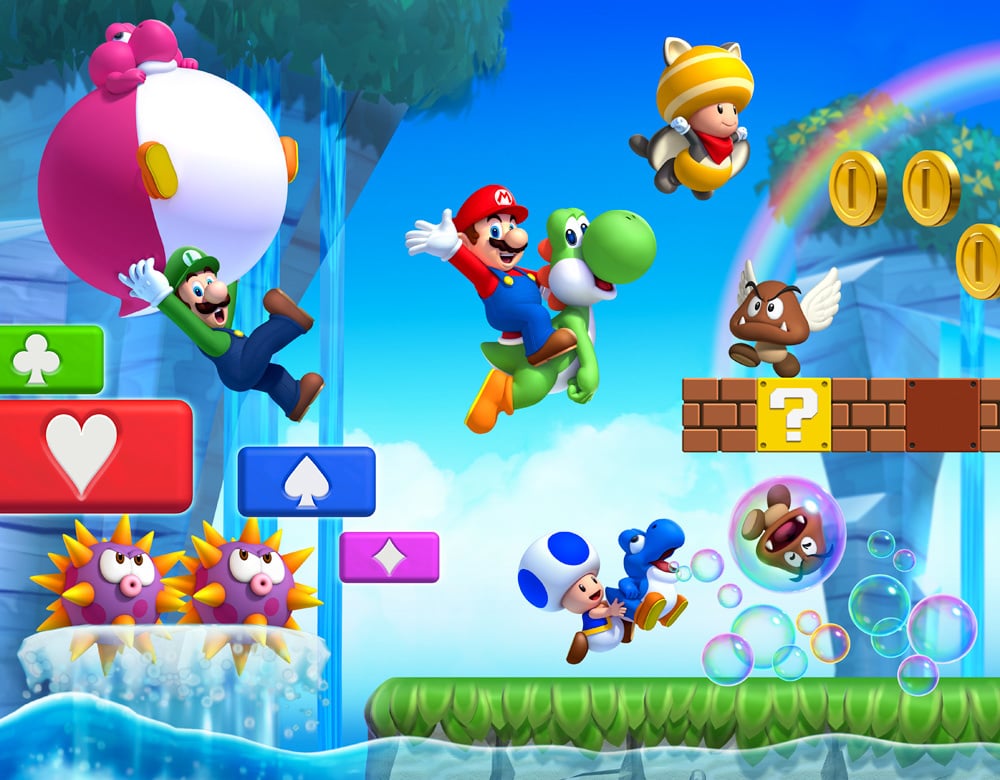 Super Mario Bros. U -If you're in the demographic to have
purchased an original Wii, you probably purchased the other Super Mario Bros.
game. If so, you're not really looking at anything new here. The over world and
backdrops were all touched up to take advantage of the higher processing power
of the Wii U, but it's essentially the same game. This isn't necessarily a bad
thing, but don't expect anything revolutionary here. FOR NON-GAMERS: If there are multiple players, the GamePad
controller can opt to not actively play on screen, but can instead place blocks
to help or hinder the other players. This means that you don't have to be a
"gamer" to be able to play the game. What happens on the TV screen also happens
on the tablet of the GamePad, so you can just sit back and poke the screen indiscriminately
causing chaos and panic in the people you play with (or helping, but who does
that?). Also, since the game appears on the GamePad, someone can actively play
the Wii U while the TV is switched to something else (movie, TV,
what-have-you). Super Mario Bros. U -If you're in the demographic to have
purchased an original Wii, you probably purchased the other Super Mario Bros.
game. If so, you're not really looking at anything new here. The over world and
backdrops were all touched up to take advantage of the higher processing power
of the Wii U, but it's essentially the same game. This isn't necessarily a bad
thing, but don't expect anything revolutionary here. FOR NON-GAMERS: If there are multiple players, the GamePad
controller can opt to not actively play on screen, but can instead place blocks
to help or hinder the other players. This means that you don't have to be a
"gamer" to be able to play the game. What happens on the TV screen also happens
on the tablet of the GamePad, so you can just sit back and poke the screen indiscriminately
causing chaos and panic in the people you play with (or helping, but who does
that?). Also, since the game appears on the GamePad, someone can actively play
the Wii U while the TV is switched to something else (movie, TV,
what-have-you).
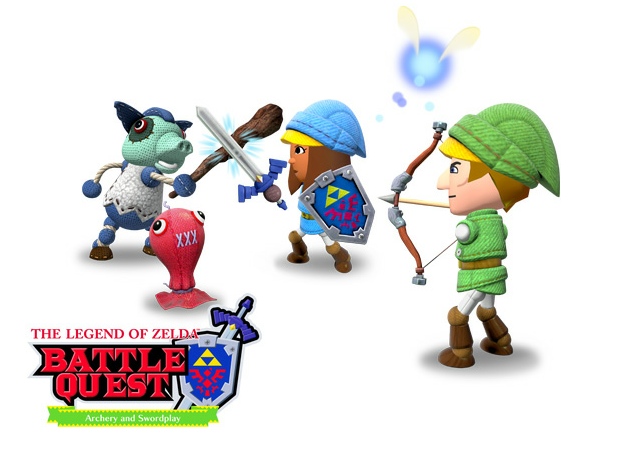 Nintendo Land - I was saving the best for last. If you go
all out and buy the deluxe version of the Wii U (see spec sheet above) you get
this game for free with the console.
So what kind of game is it? This is a particularly hard question because
Nintendo Land is really 12 games bundled into one. They vary from being
cooperative, competitive or single player, so there are a variety of options of
which to choose, right from the get-go. Each minigame is designed to exemplify
some new mechanic of the Wii U's new GamePad, and each minigame gives a taste
from one of Nintendo's various franchises. One of the competitive games from
Nintendo's franchise, Animal Crossing, has players with WiiMotes run and hide
across a map while the player using the GamePad focuses his attention on the GamePad
that shows the entire map, but does not indicate where the players are. To
prevent cheating, the Wii U's built-in camera shows the GamePad user's face on
the TV, so players can actively keep an eye on their adversary for cheating. FOR NON-GAMERS: The cooperative games
give you a chance to play along with your "more adept" colleagues by taking the
form of a support character. For example, in the Zelda minigame, whoever is in
control of the GamePad takes cheap shots at enemies as an archer while everyone
with a WiiMote charges ahead with a sword to hack and slash the enemies. Nintendo Land - I was saving the best for last. If you go
all out and buy the deluxe version of the Wii U (see spec sheet above) you get
this game for free with the console.
So what kind of game is it? This is a particularly hard question because
Nintendo Land is really 12 games bundled into one. They vary from being
cooperative, competitive or single player, so there are a variety of options of
which to choose, right from the get-go. Each minigame is designed to exemplify
some new mechanic of the Wii U's new GamePad, and each minigame gives a taste
from one of Nintendo's various franchises. One of the competitive games from
Nintendo's franchise, Animal Crossing, has players with WiiMotes run and hide
across a map while the player using the GamePad focuses his attention on the GamePad
that shows the entire map, but does not indicate where the players are. To
prevent cheating, the Wii U's built-in camera shows the GamePad user's face on
the TV, so players can actively keep an eye on their adversary for cheating. FOR NON-GAMERS: The cooperative games
give you a chance to play along with your "more adept" colleagues by taking the
form of a support character. For example, in the Zelda minigame, whoever is in
control of the GamePad takes cheap shots at enemies as an archer while everyone
with a WiiMote charges ahead with a sword to hack and slash the enemies.
Can this Wii U
whatchamacallit do anything that a mature, non-gamer adult can enjoy?
 Of course! Well, mostly! Nintendo made a partnership with
i.TV to create a one-stop interface for your television called TVii. I wasn't
able to fiddle with all of this, in part because it hasn't been released in its
entirety yet in North America. The GamePad can function as a television, a
remote control, and a streaming hub. Do you want to watch Netflix, Hulu Plus,
Amazon Instant Video, or even Youtube? You can easily access such streaming
networks through the GamePad and enjoy them on your TV, or bring them right
onto the GamePad to enjoy on your own while the TV does something else. Should
you choose to enjoy it on the TV, the GamePad knows what you're watching and
readily has links available from Wikipedia and IMDb to check on actors, release
dates, etc. at your leisure. What's currently unreleased--or I wasn't able to
see for myself--is some of the social networking tools, the DVR control
options, and some of the interfaces that appear during sports games. Of the
three, the sports interface may be the most interesting. The TV can have any
manner of show or movie playing, but you can check on your GamePad to see
player positions and scores updated in real-time. Of course! Well, mostly! Nintendo made a partnership with
i.TV to create a one-stop interface for your television called TVii. I wasn't
able to fiddle with all of this, in part because it hasn't been released in its
entirety yet in North America. The GamePad can function as a television, a
remote control, and a streaming hub. Do you want to watch Netflix, Hulu Plus,
Amazon Instant Video, or even Youtube? You can easily access such streaming
networks through the GamePad and enjoy them on your TV, or bring them right
onto the GamePad to enjoy on your own while the TV does something else. Should
you choose to enjoy it on the TV, the GamePad knows what you're watching and
readily has links available from Wikipedia and IMDb to check on actors, release
dates, etc. at your leisure. What's currently unreleased--or I wasn't able to
see for myself--is some of the social networking tools, the DVR control
options, and some of the interfaces that appear during sports games. Of the
three, the sports interface may be the most interesting. The TV can have any
manner of show or movie playing, but you can check on your GamePad to see
player positions and scores updated in real-time.
 The Wii U also makes for an interesting drawing apparatus.
Granted, it's nowhere close to a designated drawing tablet, but if you want to
sit down and do a sketch, the Wii U actually excels at being an interesting
tool to let your artistic side flourish. The Wii U also makes for an interesting drawing apparatus.
Granted, it's nowhere close to a designated drawing tablet, but if you want to
sit down and do a sketch, the Wii U actually excels at being an interesting
tool to let your artistic side flourish.
TL;DR - Too Long;
Didn't Read?
The Wii U has some work to do in front of it. A number of
features promised pre-launch still haven't come to fruition and a large portion
of the games are set out to 2013 at the earliest. With that said, there's a lot
of potential here, and not just as a gaming platform. Connectivity to all the
various forms of digital entertainment in one little bundle is incredibly
convenient and it gives the opportunity to let everyone see/do what they want
around one TV, without having to disperse to different rooms. So, should you
buy it? At the moment, it doesn't do anything that a Roku,
a couple board games, and a tablet can't do in its place, but if you think any
of its mechanics are interesting, it might be worth taking a look at this holiday
season.
Pictures from Nintendo.com
| 


 Re: Will You Buy the Wii U?


