|
What is root, or rooting? Basically it is hacking your phone or tablet to give you access to the root folder. With access to all folders and files of the device, you can alter and manipulate as you wish. By default, you are not allowed access as a root user to your phone, and this protects users from accidentally damaging the phone's software in some way. It can be dangerous if you don't know what you're doing, but with a little time and research you should be able to safely hack, or root, your Android device, allowing you to do many more things with it. See this article for more information on rooting. Below are just 5 examples.

1. Remove Bloatware
Let's Golf! 3 Eh, let's not. Remember buying your first Windows XP laptop? You brought it home, took it out of the box, turned it on, and a ton of programs you didn't want were already there on the desktop staring you in the face, like Musicmatch Jukebox, or an anti-virus program that you didn't want and could never really get rid of! You could be one of the few out there who like their brand new electronics to come pre-loaded with games and apps that you didn't want and you'll never open, like a golfing game, a Blockbuster app, City ID, or NFL Mobile. You're able to download/install/uninstall anything else as you please, but for the life of your phone you will never be able to remove those apps. You might be ok with that. For the rest of us, though, we want them gone. Sure, you can download custom launchers like ADW, LauncherPro, and Apex (which are great alternatives to MotoBlur, TouchWiz, and Sense, by the way) and hide the unwanted applications from appearing in your app drawer. But if you want them gone, no longer taking up space and no longer being needlessly updated all the time, you have to root.
If you're rooted, you can download Titanium Backup and truly delete Verizon/Sprint/etc apps that you don't want. HTC and Motorola apps, though, can break your device if you delete them. Fortunately, Titanium Backup has an option to 'freeze' those apps so that they'll never come up in Android's processes. They are still taking up a small portion of space in your phone, but in every other way they are pretty much gone. The only way to absolutely rid your phone of any and all unwanted apps/bloatware is by installing a custom ROM.
2. Custom ROMs and Kernels
A ROM is basically a customized version of your Android OS. Depending on the phone and the goals of the developer, an aftermarket or 'custom' ROM could be a few slight modifications to the OS, a major revamp, or anything in between. A custom kernel can also be flashed with a rooted phone. In computing, a kernel is what allows the hardware such as CPU, memory, and other devices (like Bluetooth or GPS chips) to talk to the software or applications. Many developers 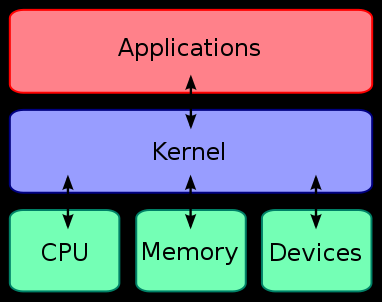 are so experienced with Android processes that they can identify certain features of a stock kernel's code that can be removed without interfering with the phone, thus running less code and consuming less power. For example, a trimmed down, 'lean', kernel can not only greatly improve battery life, but also allow the phone to perform new things like overclocking. are so experienced with Android processes that they can identify certain features of a stock kernel's code that can be removed without interfering with the phone, thus running less code and consuming less power. For example, a trimmed down, 'lean', kernel can not only greatly improve battery life, but also allow the phone to perform new things like overclocking.
Many phones, though, (mostly Motorola) have locked or signed bootloaders which severely limit the 'hackablity' of the phone's software; specifically, the inability to install a custom kernel. A bootloader is exactly what it sounds like. When the phone boots it loads the necessary processes to boot to the OS, one of which looks for the signed code by Motorola. If it doesn't see it, it doesn't boot. Many attempts have been made to crack it, but ultimately the only way to do so is Motorola handing over the keys. Android OS is open, but some manufacturers have locked down certain things and limit what a developer can change, and might make a ROM little more than a glorified theme. Most phones are basically wide open, though, and a custom ROM and/or kernel can drastically increase performance, battery life, and solve a lot of problems that the stock ROM had! Here's a list of the 5 most popular. An unlockable phone with the newest, fastest hardware, and the support of talented and established developers is sought after by many because of the options, tweaks, and performance that can be squeezed out of the device, such as overclocking.
3. Overclocking
Just as you can overclock a computer's CPU to provide enhanced performance, you can do the same to the CPU of a device running Android. Some custom devs bake this functionality into their ROMs, but if yours doesn't or you want to run the stock ROM rooted, you can install SetCPU. This app allows you to set the highest and lowest clock speeds and voltages that you'd like your CPU to run. Why would you want to do this? From a performance perspective, overclocking may allow you to use CPU intensive apps that your phone may not have been able to run before, or maybe just run them smoother. If battery life is more your thing, you can set profiles to underclock at certain times like when you're not using your phone and the screen is off, or when the battery reaches a certain percentage. You don't have to flash a custom kernel if your goal is only to underclock.
4. Block Ads
Ads are getting relentless these days. You may have installed an ad blocker for your web browser. You can do the same for Android, but not only the browser - system wide! This is great for apps where there may not be a paid version and it's full of annoying ads. I've even come across some ads that interfere with the app or game itself. This can be very frustrating, so do yourself a favor and root; then install AdFree. You can update its definitions so you'll always be free from ads on your phone!
5. Wireless Tether
If you have a laptop or tablet and your only connection to the Internet is your 3G or 4G enabled Android phone, load up Wireless Tether and connect to the Internet through your phone! Some carriers have rules and regulations about using a tethering service other than their own, so be careful that you don't abuse it or your terms of service.
How to Root Your Android Device
This would be a very long blog impossible to keep up with by one person if I listed all of the methods to root all Android phones. There are many different methods for all of the different Android phones and tablets out there. So you need to consult the large communities that support those phones to find out the most current, safest, and easiest way to root your phone. Here are the top 3 sources for Android rooting. Find your phone, root, and enjoy!
RootzWiki Forum
XDA Developers Forum
Android Central
Disclaimer: The only person responsible for breaking your device by following any of the above guides is yourself. CR4, GlobalSpec, and I take no responsibility for your device.
| 


 Re: 5 Reasons to Root Your Android Device


"Almost" Good Answers: