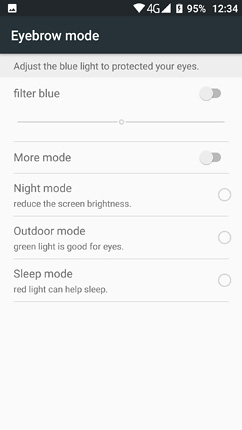
Hi, Fiddling around in the "settings" menu from my Blackview 8000 Pro phone I got into "eyebrow mode" where I activated the blue filter and slid the cursor to see how the color of the screen changed. Accidentally I touched the "more" mode button. Some seconds later, the screen got slightly yellowish and instantly got a plain dark blue / grayish color. Icons were no more visible. I rebooted the phone pressing Vol - and the power button at the same time. The Blackview icon appeared clearly, requested the unlock code, then appeared the Android 7 menu, requested the code again... and the normal home screen showed up. I unlocked the phone as usual, got into the settings menu, but the screen got slightly yellowish and the blue dark screen appeared again...
I did this a lot of times (because this weird screen blocked my phone after about 10 secs or so) I eventually got into the "eyebrow mode" menu again... surprisingly, the "more mode" sliding button (I accidentally activated) and I blamed for the disappearance of the screen was off. Some secs later, the screen got blocked again.
In the meantime I got a phone call: phone was in std by (black screen) it lit up into grey blueish ... but no buttons were to be seen. I swiped the screen as usual and could talk to the calling person.... but could not hang up (probably missed the now invisible button for doing so).
Here https://www.devicespecifications.com/en/editor-review/c5ae4f/4 I found a thorough description of my phone's menu, where I got the screenshot pasted below from.... but no clue tho solve this problem.
Any ideas?
Thank you!


 SOS Call Before Factory Rebooting Phone

 Re: SOS call before factory rebooting phone


