Previous in Forum: device drivers   Next in Forum: Looking for an obsolete data sheet
Close
Close
Close
4 comments
Rate Comments: Nested
Active Contributor

Join Date: Feb 2008
Posts: 23

Connect a Router to a Secure AP

05/24/2008 11:15 AM

I have a D-Link Access Point at my office and I need to connect some Relays that just have RJ-45 connectors, so I'm thinking in buying a Trendnet Router that has 4 Ethernet Ports, I can make the connection to the Relays, but I must change my connection. i.e. SSID: Work- internet access and office network, print, share, etc

SSID: Relay- only connection to the phisicaly connected relays

Now here is my question, Can I share the internet conection from my AP to my Router? like an AP Repeater or WIFI amplifier?

AP=DWL-2100AP D-Link

Router=TEW-632BRP TrendNet

Register to Reply
Interested in this topic? By joining CR4 you can "subscribe" to
this discussion and receive notification when new comments are added.
Power-User
Popular Science - Weaponology - New Member Popular Science - Evolution - New Member United States - Member - New Member

Join Date: Apr 2007
Posts: 298
Good Answers: 3
#1

Re: Connect a Router to a Secure AP

05/25/2008 1:48 AM

I thought the AP was to be pluged into a router to give you wireless access? Do you just have a Cat5e cable coming into your office with the AP hooked to it? If so, that cable is coming from a router or switch already. No need to buy a router then, just buy another switch.

You would then install the switch you buy on the end of the cable coming into your office and plug the wireless AP into that with a short Cat5e cable. Instantly up and running.

My old setup: Cable modem -> router (which has 4 ports)

Lack of access ports, so:

New setup: Cable modem -> router -> 8 port switch

Now I just plug everything into the switch and it handles the switching for me. I bought this one: http://www.dlink.com/products/?sec=0&pid=495

DGS-2208 > 8-Port 10/100/1000 Desktop Switch

Ran out of access ports at my shop too, bought a d-link switch and ran a cable from it to the router and started plugging my other equipment into the switch. Love it.

Switches are great!

Ken

Register to Reply
Active Contributor

Join Date: Feb 2008
Posts: 23
#2
In reply to #1

Re: Connect a Router to a Secure AP

05/25/2008 5:34 AM

thanks ken for your answer, but what I want to do is to connect with out any cables the AP to the Router.

Something like this

Modem -> Switch (for some wired connections I have) -> AP (wireless) -> Router (if posible -> General Electric Multilin Relays

Because the floor with the Relays is not wired.

Thanks again.

Cristhian De la Reza

Register to Reply
Power-User
Popular Science - Weaponology - New Member Popular Science - Evolution - New Member United States - Member - New Member

Join Date: Apr 2007
Posts: 298
Good Answers: 3
#4
In reply to #2

Re: Connect a Router to a Secure AP

05/25/2008 9:52 AM

Hello Cristhian,

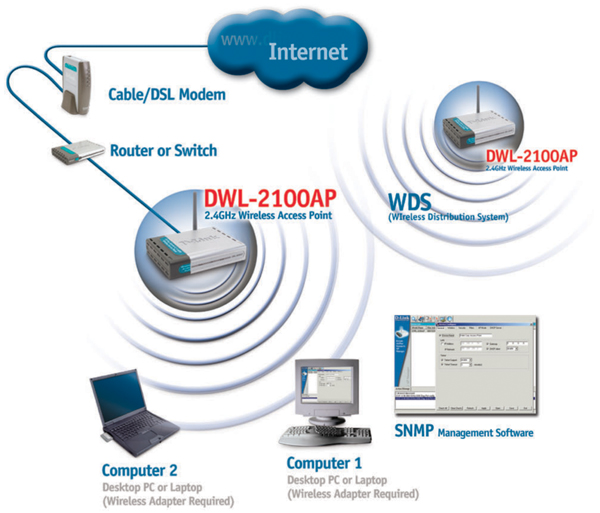
You have your order wrong. The following diagram shows the correct order like I stated. The router has to be installed next after the router. (if it going to be used as a router) Then the AP. You could plug both the AP and the switch into the router. But 1st thing into the modem is the router.

Then you could use a 2nd DWL-2100AP on the floor above or below (wherever the GE switches are) to run the GE switches. I take it you are using something like their DGT switches.

Your only internet connection to that floor would be wireless then.

But it would require the 2nd DWL-2100AP to do what you wish to do, if I am reading their info on their website.

http://images.dlink.com/products/DWL-2100AP/DWL-2100AP_diagram.jpg

But I think your 1st AP is going to have to be hardwired. So, another $100 to get a 2nd one for the other floor.

Regards,

Ken

Register to Reply
Anonymous Poster
#3

Re: Connect a Router to a Secure AP

05/25/2008 8:05 AM

I think you need a bridge and not an access point. I tried this before and the access point only allowed one MAC address to pass.. linksys used to sell a "WET", not sure if they still do..

Register to Reply
Register to Reply 4 comments
Copy to Clipboard

Users who posted comments:

Anonymous Poster (1); cdelareza (1); MrChevy (2)

Previous in Forum: device drivers   Next in Forum: Looking for an obsolete data sheet

Advertisement