Previous in Forum: Which Way is Better Between DI Box and Microphone   Next in Forum: Certification Exams for Embedded Systems?
Close
Close
Close
23 comments
Rate Comments: Nested
Guru
United Kingdom - Member - Not a New Member Hobbies - Musician - New Member Hobbies - Fishing - New Member

Join Date: May 2006
Location: Reading, Berkshire, UK. Going under cover.
Posts: 9684
Good Answers: 468

Laptop Wireless Improvement

04/14/2010 7:29 AM

I have a home/office network using a Belkin wireless N router and a Sitecom wireless G repeater with a high-gain external antenna. My Acer TravelMate 4230 has wireless G, and an internal antenna with no provision for connecting an external one.

The laptop can connect fine anywhere in the house; my problem is that in my second office (the pub across the road), the laptop can see my network router (signal strength good to excellent - depending how busy the road is) and see the repeater (signal strength good), but cannot connect. I assume this is because the laptop antenna isn't up to the job.

Does anyone have any practical advice on how to improve the laptop wireless performance? Preferably 1st or close 2nd hand info - I'm pretty good at doing my own google searches, and anyway I'd rather hear from someone who's been there and done it.

Thanks in anticipation,
John

__________________
"Love justice, you who rule the world" - Dante Alighieri
Register to Reply
Interested in this topic? By joining CR4 you can "subscribe" to
this discussion and receive notification when new comments are added.

"Almost" Good Answers:

Check out these comments that don't yet have enough votes to be "official" good answers and, if you agree with them, vote them!
Guru
United States - Member - New Member

Join Date: Mar 2010
Location: In the pool because it is too hot.
Posts: 3054
Good Answers: 141
#1

Re: Laptop Wireless Improvement

04/14/2010 10:08 AM

Seems you are good in the house part of the story. Communication has to go 2 way. The signal your laptop sends is probably to weak. I am travelling a lot and I use a plug in small booster device (goes into a USB port- mine is linksys with a small orientable antenna). Most of the time I get to connect through a non secured network.

__________________
Plenty of room here
Register to Reply Score 1 for Good Answer
Guru

Join Date: Jan 2010
Posts: 2446
Good Answers: 60
#2

Re: Laptop Wireless Improvement

04/14/2010 11:03 AM

If your two properties are on the same ring main you may be able to use a mains

http://www.maplin.co.uk/internet_over_mains.search

have you tried moving the router close to the end wall or better still window of the main property to improve line of site comms ?

Register to Reply
Guru
United Kingdom - Member - Not a New Member Hobbies - Musician - New Member Hobbies - Fishing - New Member

Join Date: May 2006
Location: Reading, Berkshire, UK. Going under cover.
Posts: 9684
Good Answers: 468
#3
In reply to #2

Re: Laptop Wireless Improvement

04/14/2010 11:12 AM

They're not keen on people using the mains outlets in the pub - even if it could work.

The router is in my home office - in the loft conversion, with no windows on the side nearest the pub, but the router is as near the wall at the nearest point to the pub as I can get it.

The repeater antenna is on the sill of a first floor window directly across the road from the pub.

__________________
"Love justice, you who rule the world" - Dante Alighieri
Register to Reply
Guru

Join Date: Jan 2010
Posts: 2446
Good Answers: 60
#4
In reply to #3

Re: Laptop Wireless Improvement

04/14/2010 12:13 PM

Take a look at this link, the plug in wi fi units have a better airiel than the laptops internal airiel the lap tops airile is just a piece of wire that runs form the mother board of the pc and runs up through the hinge it has no gain, also because it has no gain it may be picking up interference from the gaming machines in the pub, also if the pub has wifi that will interfere with reception

http://www.wifi-antennas.co.uk/?gclid=CMOuku3IhqECFQZslAodXSvMwA

try one of the cheaper ones

Click to view more details ››

54Mbps USB WiFi Access point with Detachable 5dBi Antenna (RP-SMA).

Part No: AP-USB-G-5DB

Price (ex VAT): £21.69

(£25.49 inc VAT) Price (ex VAT): £0.00
Register to Reply
Guru
United Kingdom - Member - Not a New Member Hobbies - Musician - New Member Hobbies - Fishing - New Member

Join Date: May 2006
Location: Reading, Berkshire, UK. Going under cover.
Posts: 9684
Good Answers: 468
#7
In reply to #4

Re: Laptop Wireless Improvement

04/15/2010 11:15 AM

Thanks - I don't want to pay too much for this - it's not essential to have access to CR4 in the pub - but it would be nice!

It's around the right price.

Whatever I get I don't want to find it still doesn't work & I've just wasted £20 - £30.

I'll have to think about it.

[Edit - I've just noticed it's a 54g product - I'm thinking I'd be better off with wireless N]

__________________
"Love justice, you who rule the world" - Dante Alighieri
Register to Reply
Guru

Join Date: Jan 2010
Posts: 2446
Good Answers: 60
#8
In reply to #7

Re: Laptop Wireless Improvement

04/15/2010 11:20 AM

OkyDoky

Register to Reply
Guru

Join Date: Jan 2010
Posts: 2446
Good Answers: 60
#11
In reply to #7

Re: Laptop Wireless Improvement

04/16/2010 6:12 PM

so you want a fix that doesnt cost anything ?

aint goin to happen unless you steal it,

one other thought, on my wireless router you can turn the power up and down,

and i belive you can do the same on the laptop if i find out how i will let you know

Register to Reply
Guru
United Kingdom - Member - Not a New Member Hobbies - Musician - New Member Hobbies - Fishing - New Member

Join Date: May 2006
Location: Reading, Berkshire, UK. Going under cover.
Posts: 9684
Good Answers: 468
#12
In reply to #11

Re: Laptop Wireless Improvement

04/16/2010 6:24 PM

"so you want a fix that doesnt cost anything ?"

Doesn't everyone? BUT PLEASE read my post #9.

__________________
"Love justice, you who rule the world" - Dante Alighieri
Register to Reply
Guru

Join Date: Dec 2007
Location: Cypress Calif
Posts: 741
Good Answers: 23
#5

Re: Laptop Wireless Improvement

04/14/2010 11:14 PM

Hello John:

I have plenty of firsthand experience (with pubs) but little with your particular problem. A cardbus adapter or USB adapter with an external antenna should help. The only firsthand experience I have is to tell you a simple stick USB adapter didn't improve the reception on my Toshiba.

The only other trivia I can add is it turning off the 5 GHz signal in my router improved its range in the 2.4 GHz N and G modes. I realize you have the G repeater already, info offered for future reference in case you have a dual band router and end up purchasing a N capable adapter, and want to try the N directly to the router, (from the second office) for empirical verification of course.

Hopefully the link I'm going to post will be of help. The company has an extensive stock complete with descriptions and operating specifications. Maybe it'll save you a little time playing with google. Mind your P's+Q's.

http://www.mwave.com/mwave/subcategory.asp?CatID=191&parent=4^188

__________________
"The reasonable man adapts himself to the world; the unreasonable one persists in trying to adapt the world to himself. Therefore all progress depends on the unreasonable man" George Shaw
Register to Reply
Guru
United Kingdom - Member - Not a New Member Hobbies - Musician - New Member Hobbies - Fishing - New Member

Join Date: May 2006
Location: Reading, Berkshire, UK. Going under cover.
Posts: 9684
Good Answers: 468
#9
In reply to #5

Re: Laptop Wireless Improvement

04/15/2010 11:27 AM

Cheers - they carry a similar (but wider) range at Maplin - the problem is figuring out which to go for. Don't want to waste money by getting something cheap-ish that just isn't up to the job, or going the other way and spending more than I need to.

(I'm feeling particularly stingey this year - my elder daughter's getting married in December!)

__________________
"Love justice, you who rule the world" - Dante Alighieri
Register to Reply
Guru
United States - Member - New Member

Join Date: Mar 2010
Location: In the pool because it is too hot.
Posts: 3054
Good Answers: 141
#22
In reply to #9

Re: Laptop Wireless Improvement

04/17/2010 10:44 AM

You could try to take the antenna from the router and put it on a stand outside the building. Connect with good and short coax cable. (small hole for the cable through the wall). First try with the router there, to see if it works. The wall might be just the critical obstacle. Can you detect your router in the pub now? What strength it shows?

__________________
Plenty of room here
Register to Reply
Active Contributor

Join Date: Dec 2007
Posts: 16
Good Answers: 1
#6

Re: Laptop Wireless Improvement

04/15/2010 10:26 AM

Some laptops are configured to disconnect the communications card on battery power. Are you plugged into an electrical outlet? If so, you may want to follow the good advice of our other colleagues. Otherwise, it may be as simple as an adjustment of your settings.

Register to Reply
Guru
United Kingdom - Member - Not a New Member Hobbies - Musician - New Member Hobbies - Fishing - New Member

Join Date: May 2006
Location: Reading, Berkshire, UK. Going under cover.
Posts: 9684
Good Answers: 468
#10
In reply to #6

Re: Laptop Wireless Improvement

04/15/2010 11:29 AM

Good thought - but mains power isn't the problem - I've used in on battery at access points all over the place.

__________________
"Love justice, you who rule the world" - Dante Alighieri
Register to Reply
Guru

Join Date: Jan 2010
Posts: 2446
Good Answers: 60
#13

Re: Laptop Wireless Improvement

04/16/2010 6:50 PM

http://www.sitecom.com/showdownload.php?id=2812

do you have any cordless phones in you house?

if yes try moving them away from the routers, they work at the same frequency and will make the routers deaf in radio terms.

the more i look into the problem if you do have a cordless phone near either router then you need to move the or for the purpose of elimination unplug your cordless phones from the mains go to the pub and see if that fixes it

info from various sites

  • 2.4 GHz (allocated in 1998)
  • 5.8 GHz (allocated in 2003 due to crowding on the 2.4 GHz band
  • 2.4 GHz band are increasingly being used for a host of other devices, including baby monitor, microwave oven, Bluetooth, wireless LAN; thus, it is likely that a cordless phone will suffer interference from signals broadcast by those devices. It is also possible for a cordless phone to interfere with the 802.11a wireless standard, as the 802.11a standard can be configured to operate in the 5.8 GHz range. However, this can easily be fixed by configuring the device to work in the 5.180 GHz to 5.320 GHz band. 2.4 gHz might have enabled the cordless phone revolution, but he's glossing over a few details. 2.4 gHz is a very popular frequency. Car alarms use it, not to mention baby monitors, microwave ovens, and even your favorite wireless computer network. Since they use the same frequency, all of these devices can interfere with good old 2.4 gHz. That's were I (5.8gHz) come in, less interference means better call quality.
Register to Reply
Guru

Join Date: Jan 2010
Posts: 2446
Good Answers: 60
#14

Re: Laptop Wireless Improvement

04/16/2010 7:04 PM
your router uses 2.4 gigs same as the dect phone this i would say is the problem Specs Specifications:
Bandwidth20 MHz & 20/40 MHz auto
Compliant StandardIEEE 802.11b, 802.11g, and 802.11n
FirewallNAT (Network Address Translation), SPI (Stateful Packet Inspection)
Hardware Interface Type5xRJ45 (4 LAN, 1 WAN)
HumidityOperating: 10 ~ 85%, Storing: 5 ~ 95% non-condensing
IP Sharing MethodNetwork Address Translation (NAT)
ISP Protocols SupportedDynamic, Static, PPPoE, PPTP, Telstra Bigpond, L2TP
LEDsSecurity, Wireless, Wired, Router, Modem, Internet
Link RateUp to 300Mbps in 40MHz Channel Mode
Maximum Users253 of which 16 wireless
Quality Of Service802.11e/WMM
Radio Frequency BandISM Band: 2400-2483.5 MHz (2.4 GHz)
Radio Frequency Band1Europe: 1-13
RangeUp to 1,200 ft.
Reset ProcessHold the reset button for 10 seconds when the router is powered
SecurityWi-Fi Protected Setup, 256-bit WPA/WPA2™-Personal, 64-bit, 128-bit WEP encryption
Specifications StandardsIEEE 802.11b , IEEE 802.11g , IEEE 802.11n
Supported LanguagesEnglish, German, French, Spanish, Dutch, Italian, Simplified Chinese, Traditional Chines, Japanese, Korean
Supporting SoftwareWindows 2000, XP, Vista and Mac OS 10.4 or 10.5 for Setup Assistant; any OS with TCP/IP support for normal operation
User InterfaceHTML Browser based User Interface (http://192.168.2.1)
VPN SupportPPTP IPSec pass-through
Register to Reply
Guru

Join Date: Jan 2010
Posts: 2446
Good Answers: 60
#15

Re: Laptop Wireless Improvement

04/16/2010 7:23 PM

just found some more info, bluetooth works on 2.4

  1. Bluetooth operates in the 2.4 Gigahertz band.
  2. dect works on 2.4
  3. microwaves work on 2.4

so to establish location of problem turn dect phones of at mains

if you wear a blue tooth ear piece turn that off

if you have blue tooth enabled on your mobile turn it off.

do the above one at a time to establish which one is causing the problem

Hope this helps

Register to Reply
Guru

Join Date: Jan 2010
Posts: 2446
Good Answers: 60
#16

Re: Laptop Wireless Improvement

04/16/2010 7:37 PM

last post.

ive just tested my mobile with bluetooth turned on and the signal is quite strong ( i have a requency counter.

and the plantronics blue tooth ear piece is quite strong as well.

and ive just tested my dect phone and thats really strong

so based on my tests i would say first choice is dect phone near one of the routers, followed by blue tooth on mobile.

Register to Reply
Guru

Join Date: Jan 2010
Posts: 2446
Good Answers: 60
#17

Re: Laptop Wireless Improvement

04/17/2010 5:24 AM

are there any of these wireless cctv systems in the pub as these work on 2.4 ghz as well as the other sugestions i have made.

if any of them work please let me know for future refrence thanks

Register to Reply
Guru
United Kingdom - Member - Not a New Member Hobbies - Musician - New Member Hobbies - Fishing - New Member

Join Date: May 2006
Location: Reading, Berkshire, UK. Going under cover.
Posts: 9684
Good Answers: 468
#18
In reply to #17

Re: Laptop Wireless Improvement

04/17/2010 6:48 AM

DECT phones both at home and in the pub (plus neighbouring flats, definitely below mine and probably to either side). My DECT handset works fine in the pub (the base station is on the other side of my desk from my router), and up to about 50yds down the road (nearly to the Chinese take-away).

During relatively quiet times, there are probably about a dozen mobile phones in the pub, at least half of which with Bluetooth enabled (judging from the number of earpieces visible) - searching for Bluetooth devices from my phone rarely finds fewer than 6, but there could obviously be more with visibility turned off.

A bus going past could easily be carrying another 50-odd mobiles.

AFAIK, all the pub CCTV cameras are wired, but I'll check later.

My laptop finds up to 15 wireless networks, depending on the time of day (I just checked and found 9).

Getting these potentially interfering devices turned off is clearly not an option - I've got to live with it & work around it.

Cheers,
John

__________________
"Love justice, you who rule the world" - Dante Alighieri
Register to Reply
Guru

Join Date: Jan 2010
Posts: 2446
Good Answers: 60
#19

Re: Laptop Wireless Improvement

04/17/2010 7:54 AM

ok thanks for replying.

the outside airiel on router is it directional ? or could you get a directional one and point towards pub?

reception of radio waves

the best analogy i can give is the crowded room situation.

you sit in a room listening to a radio in the corner that you can just hear,

the room fills with people all talking, the radio is still there but you cannot hear it because of the back ground nose, radio works in a simalar way if there too much back ground noise it cannot receive a clear signal.

the only answer is to turn up the power or volume or eliminate the background noise,

or use directional sound or radio signals so best using the avalable signal.

most airiels work omnidirectional that is the signal is sent in all directions, But the reception can be improved if the signal is only sent in the direction its required

http://www.radiolabs.com/Articles/wifi-antenna.html

omni directional

... Polarization Bountiful WiFi Bwant-13dBi Bountiful WiFi Outdoor Bountiful WiFi

http://www.youtube.com/watch?v=hNFKbcJ_WK8

MAPLINS

CR4 Admin: Modified Post

Copyright Violation: Reduced copied text according to copyright law. Please see Section 13 of the CR4 FAQ about posting copyrighted material.

Register to Reply
Guru
United Kingdom - Member - Not a New Member Hobbies - Musician - New Member Hobbies - Fishing - New Member

Join Date: May 2006
Location: Reading, Berkshire, UK. Going under cover.
Posts: 9684
Good Answers: 468
#20
In reply to #19

Re: Laptop Wireless Improvement

04/17/2010 9:20 AM

I have this antenna attached to the repeater:

http://www.maplin.co.uk/Module.aspx?ModuleNo=48744

I have it aligned so that it's more-or-less normal to the area where I sit in the pub (to maximize the signal). As I mentioned earlier, the laptop picks up a stronger signal from the router than from the repeater.

The modem/router has 3 antennae:

http://www.belkin.com/IWCatProductPage.process?Product_Id=275346

These antennae don't appear to be removable/replaceable. I've tried angling them in various orientations.

I think it's coming down to adding some kind of adapter (USB or PCMCIA-type) to the laptop; I'm just not sure which to go for.

Maybe it's time for me to start trawling the web for user reviews.

Thanks for all your suggestions.
John.

__________________
"Love justice, you who rule the world" - Dante Alighieri
Register to Reply
Guru

Join Date: Jan 2010
Posts: 2446
Good Answers: 60
#23
In reply to #20

Re: Laptop Wireless Improvement

04/17/2010 11:04 AM

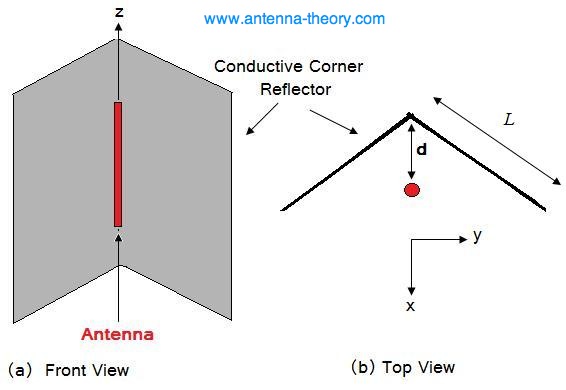
the airiel on your repeater is an omni directional one ie it works in all directions you could try placing a piece of metal shaped like an L behind it so the open side is facing the pub make the spacing between the reflector and the ariel 2.4 inches from corner

heres what you are trying to make

To increase the directivity of an antenna, a fairly intuitive solution is to use a reflector. For example, if we start with a wire antenna (lets say a half-wave dipole antenna), we could place a conductive sheet behind it to direct radiation in the forward direction. To further increase the directivity, a corner reflector may be used, as shown in Figure 1. The angle between the plates will be 90 degrees.

Figure 1. Geometry of Corner Reflector.

The radiation pattern of this antenna can be understood by using image theory, and then calculating the result via array theory. For ease of analysis, we'll assume the reflecting plates are infinite in extent. Figure 2 below shows the equivalent source distribution, valid for the region in front of the plates.

http://www.freeantennas.com/projects/Ez-10/

Register to Reply
Guru
United States - Member - New Member

Join Date: Mar 2010
Location: In the pool because it is too hot.
Posts: 3054
Good Answers: 141
#21

Re: Laptop Wireless Improvement

04/17/2010 10:34 AM

Normally, a decent pub should provide free wireless internet as incentive, no? Probably internet access there is expensive and limited to small downloads?

__________________
Plenty of room here
Register to Reply
Register to Reply 23 comments

"Almost" Good Answers:

Check out these comments that don't yet have enough votes to be "official" good answers and, if you agree with them, vote them!
Copy to Clipboard

Users who posted comments:

AppsGuy (1); dvmdsc (3); JohnDG (7); peterg7lyq (11); YWROADRUNNER (1)

Previous in Forum: Which Way is Better Between DI Box and Microphone   Next in Forum: Certification Exams for Embedded Systems?

Advertisement