Previous in Forum: Unlocking a Mobile Phone   Next in Forum: Computer Security
Close
Close
Close
23 comments
Rate Comments: Nested
Power-User
United States - Member - New Member

Join Date: May 2008
Location: Arizona
Posts: 355
Good Answers: 4

Blocking Spam in Outlook Express

11/05/2008 6:57 PM

Good afternoon, folks.

It doesn't seem to do any good when I hit "Block Sender". I still get multiple messages from the same companies for days and days. Is there a way to make it work, or is it hopeless? I have Outlook Express. Thx.

Register to Reply
Interested in this topic? By joining CR4 you can "subscribe" to
this discussion and receive notification when new comments are added.

Good Answers:

These comments received enough positive votes to make them "good answers".
Power-User
Hobbies - Musician - New Member

Join Date: Apr 2006
Location: Brigham City, Utah
Posts: 163
Good Answers: 5
#1

Re: Blocking spam.

11/05/2008 9:06 PM

I have the same problem, If I just delete everything the spam starts to slow down, but if I block or unsubscribe, it just multiplies immensely. I only have the problem with msn mail. I do not have a problem with g-mail or yahoo mail. I have tried everything I can and still have to wade through 50 - 200 e-mails each day. I would just walk away from my msn mailbox if I could, but I'm paying $79.00 per month for it as part of a package deal with Quest internet. I wish there were an alternative, but when you live in a small town you have to accept the only provider or go without.

__________________
Kindness knows no boundaries.
Register to Reply
Anonymous Poster
#2
In reply to #1

Re: Blocking spam.

11/06/2008 1:00 AM

Open a Gmail account - it's free. Be sure to "mark as spam" anything that you don't want. I get at least 100 to 150 spams a day that go directly into my spam folder.Only 2 or 3 of them make it to my inbox. I use different email accounts for things such as entering contests or anything else that seems to draw spammers out from under the rock where they reside.

Register to Reply
Power-User
United States - Member - New Member

Join Date: May 2008
Location: Arizona
Posts: 355
Good Answers: 4
#3
In reply to #1

Re: Blocking spam.

11/06/2008 7:47 AM

gOOD morning, guys. Thx for the notes. I kind of thot they may have a device that tells them when a computer uses the "Block Sender", which tells them to automatically keep sending that computer repeat messages. Logically, they couldn't expect to make any sales to a person like that, so the repeat messages must be their form of punishment for a person who has the audacity to try to block their sales message. Anyway, I will first simply delete them; hopefully that will be sufficient.

Register to Reply
3
Guru

Join Date: Aug 2005
Location: Hemel Hempstead, UK
Posts: 5826
Good Answers: 322
#13
In reply to #1

Re: Blocking spam.

11/07/2008 2:17 AM

Never unsubscribe, unless your absolutely certain the sender is honourable. Unsubscribing just tells the spammers that they have reached a valid address.

__________________
If you spend all your time looking for people and things to complain about: trust me, you will find plenty to complain about.
Register to Reply Good Answer (Score 3)
Power-User
United States - Member - New Member

Join Date: May 2008
Location: Arizona
Posts: 355
Good Answers: 4
#16
In reply to #13

Re: Blocking spam.

11/07/2008 10:08 AM

Good morning Randall. I'm assuming "unsubscribe" means "Block Sender". I've quit doing that as a result of an earlier response.

Register to Reply
Guru

Join Date: Aug 2005
Location: Hemel Hempstead, UK
Posts: 5826
Good Answers: 322
#22
In reply to #16

Re: Blocking spam.

11/10/2008 2:49 AM

No: adding the sender to the blocked senders list is OK. It's replying with unsubscribe as the subject, or, clicking on an unsubscribe link which gives information back to the sender.

__________________
If you spend all your time looking for people and things to complain about: trust me, you will find plenty to complain about.
Register to Reply
Power-User

Join Date: Nov 2007
Location: Dominican Republic
Posts: 278
Good Answers: 10
#4

Re: Blocking spam.

11/06/2008 9:21 AM

I agree with Gmail and you can tie ir into your pop email so you don't have to open the internet.I have used outlook but did not like having to block everything. I now use Thunderbird by Mozilla. the junk filter learns as it goes along.

Very little spam now.

Register to Reply
Power-User
United States - Member - New Member

Join Date: May 2008
Location: Arizona
Posts: 355
Good Answers: 4
#5
In reply to #4

Re: Blocking spam.

11/06/2008 10:24 AM

Good morning DGCYS. What is meant by ir? Thx.

Register to Reply
Power-User

Join Date: Nov 2007
Location: Dominican Republic
Posts: 278
Good Answers: 10
#6

Re: Blocking spam.

11/06/2008 10:47 AM

Sorry,

It "tie" into you pop email. See Gmail help for set up. It's easy and you have more control over your files.

Register to Reply
Power-User
United States - Member - New Member

Join Date: May 2008
Location: Arizona
Posts: 355
Good Answers: 4
#7
In reply to #6

Re: Blocking spam.

11/06/2008 12:24 PM

DGCYS, thx, I will try it.

Register to Reply
Guru

Join Date: Sep 2007
Location: Wrong end of the yellow brick road in Oz
Posts: 930
Good Answers: 15
#8

Re: Blocking Spam in Outlook Express

11/06/2008 10:59 PM

For outlook, go and check out "SpamBayes"

http://spambayes.sourceforge.net/

Best part is that its Free, Learns, and you get to keep the cludgy Outlook

You may also need to install Python too.

http://www.python.org/

I have about 1000+ E-mails in my "Junk folder" (where spamBayes puts the junk) that I have running "Auto Archive" set to 1 month

If your running off a *nix server, have a look at dspam

__________________
Qn, Whats the differance between a Snake and a Onion? Ans, No one cries when you chop up a Snake
Register to Reply
Anonymous Poster
#9

Re: Blocking Spam in Outlook Express

11/06/2008 11:16 PM

Try a novel Spam solution that has no filters and no Junk folders at all - see www.enterto.com - you can use a bowser of a client like outllook

Jeff

Register to Reply
Commentator

Join Date: Oct 2007
Posts: 98
Good Answers: 2
#10

Re: Blocking Spam in Outlook Express

11/07/2008 12:18 AM

If you are checking your mails only once or twice a day, I suggest you open a gmail account and also add the option of pulling mails from gmail into your outlook express.

Gmail has the option of pulling mails from yahoo, hotmail, etc. or from your own server at regular intervals. This is useful since gmail has a very good spam filter which should filter your unwanted spams from msn mail.

This way, your outlook express will download only filtered mails from msn and gmail, greatly reducing the spams.

Register to Reply
Power-User
United States - Member - New Member

Join Date: May 2008
Location: Arizona
Posts: 355
Good Answers: 4
#18
In reply to #10

Re: Blocking Spam in Outlook Express

11/07/2008 10:32 AM

Good morning Humble Ess. Thx for your note. I DO only check my email only 1 or 2/day; usually only 1.

I have a lot of business cards & contacts that have my email address. If I use Gmail, I will lose that address, right?

Register to Reply
3
Guru
Popular Science - Weaponology - bwire Hobbies - Car Customizing - New Member

Join Date: Dec 2007
Location: Upper Mid-west USA
Posts: 7498
Good Answers: 97
#21
In reply to #18

Re: Blocking Spam in Outlook Express

11/07/2008 12:07 PM

To set up your Outlook Express client to work with Gmail:

  1. Enable IMAP in Gmail. Don't forget to click Save Changes when you're done.
  2. Open Outlook Express.
  3. Click the Tools menu, and select Accounts...
  4. Click Add, and then click Mail...
  5. Enter your name in the 'Display name' field, and click Next.
  6. Enter your full email address (username@gmail.com) in the 'Email address' field, and click Next. If you are a Google Apps user, enter your full address in the format 'username@your_domain.com.'
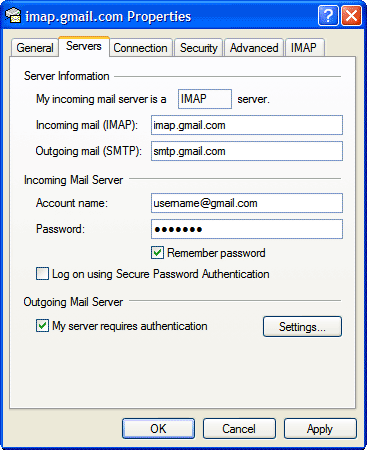
  7. For 'My incoming mail server is a ______ server', please select IMAP in the drop-down menu.
  8. Enter 'imap.gmail.com' in the 'Incoming mail (POP3, IMAP or HTTP) server' field. Enter 'smtp.gmail.com' in the 'Outgoing mail (SMTP) server' field.
  9. Click Next.
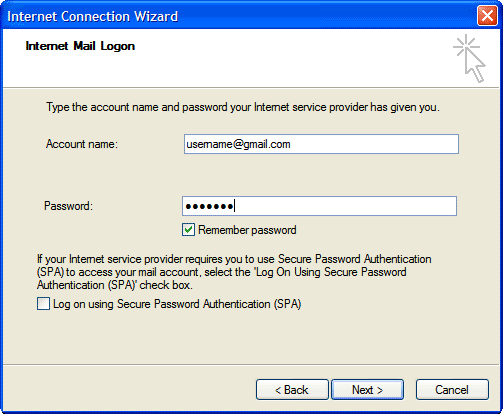
  10. Enter your full email address (including '@gmail.com' or '@your_domain.com') in the 'Account name' field. Enter your password in the 'Password' field, and click Next.
  11. Click Finish.
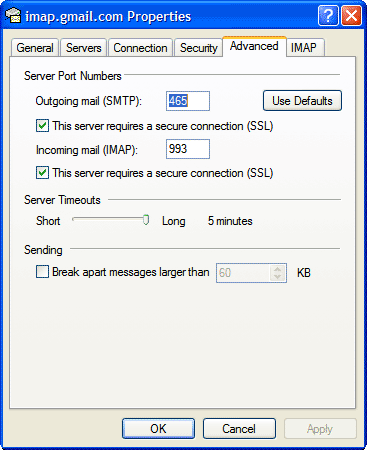
  12. Highlight imap.gmail.com under Account, and click Properties.
  13. Click the Advanced tab.
  14. Under Outgoing Mail (SMTP), check the box next to 'This server requires a secure connection (SSL).'
  15. Enter '465' in the 'Outgoing mail (SMTP)' field.
  16. Under Incoming mail (IMAP), check the box next to 'This server requires a secure connection (SSL)'. The port will change to '993'.
  17. Click the Servers tab, and check the box next to 'My server requires authentication.'
  18. Click OK.
  19. Check our recommended client settings, and adjust your client's settings as needed.

Congratulations! You're done configuring your client to send and retrieve Gmail messages.

__________________
If death came with a warning there would be a whole lot less of it.
Register to Reply Good Answer (Score 3)
Guru

Join Date: Sep 2007
Location: Wrong end of the yellow brick road in Oz
Posts: 930
Good Answers: 15
#11

Re: Blocking Spam in Outlook Express

11/07/2008 12:36 AM

Due to not really much information, everyone is assuming the "upstream" source of this person's E-mails.

FlyingHigh: could you enlighten us as to how you configured your OE to collect its E-mails.

Private home collecting from a web mail account?

Private home with your own mail server

Company account collecting from the company E-mail server (generally, a Hotmail/Gmail/Yahoomail isn't used in company situations)

__________________
Qn, Whats the differance between a Snake and a Onion? Ans, No one cries when you chop up a Snake
Register to Reply
Power-User
United States - Member - New Member

Join Date: May 2008
Location: Arizona
Posts: 355
Good Answers: 4
#19
In reply to #11

Re: Blocking Spam in Outlook Express

11/07/2008 11:01 AM

Good morning Snaketails. This is a private home. I use Outlook Express. If there is such a thing as simply "Outlook", what is the difference?

Register to Reply
Guru
Popular Science - Weaponology - New Member Netherlands - Member - New Member Fans of Old Computers - Commodore 64 - New Member

Join Date: Sep 2007
Location: Japan
Posts: 2703
Good Answers: 38
#12

Re: Blocking Spam in Outlook Express

11/07/2008 2:16 AM

Stop using outlook is the best solution

__________________
From the Movie "The Big Lebowski" Don't pee on the carpet man!
Register to Reply
Power-User

Join Date: Nov 2007
Location: Dominican Republic
Posts: 278
Good Answers: 10
#14

Re: Blocking Spam in Outlook Express

11/07/2008 6:43 AM

For Gmail open gmail go to help\access choices\POP

There is help to open Gmail in the following:

Register to Reply
Guru
Hobbies - DIY Welding - Wannabeabettawelda

Join Date: May 2007
Location: Annapolis, Maryland
Posts: 7940
Good Answers: 458
#15

Re: Blocking Spam in Outlook Express

11/07/2008 9:40 AM
Register to Reply Off Topic (Score 5)
Member

Join Date: Feb 2007
Location: Allen, Texas (north Dallas)
Posts: 7
#17

Re: Blocking Spam in Outlook Express

11/07/2008 10:13 AM

You might try developing a rule for forwarding certain inbound addresses to a spam folder (you need to create). That same rule would be able to delete the messages in your inbox at the same time. Full Outlook has that ability, but I don't know if Outlook Express has the same abilities. Look under "tools" and "rules and alerts".

Hope this helps.

Register to Reply
Power-User

Join Date: Mar 2006
Location: Valdosta, GA
Posts: 361
Good Answers: 8
#20

Re: Blocking Spam in Outlook Express

11/07/2008 12:02 PM

You need to open MSN with your browser to change your Hotmail (now Windows Live mail) settings. To block the most spam (bulk mail) you will have to go to options once you have signed in to your email account. Under options you will see "more..." at the bottom of the drop down. Click on this and then on "filters and reporting" under "Junk E-mail." If you set your prefference to "Exclusive" your junk e-mail should go into your Bulk e-mail folder. Periodically check this folder to make sure you are not missing wanted messages then in Outlook express you can select all messages in this folder and delete them anytime you want.

Regards,

Keywalker

__________________
Always use protection.
Register to Reply
Power-User
United Kingdom - Member - Hobbies - HAM Radio - G7TSP Engineering Fields - Electrical Engineering -

Join Date: Jul 2008
Location: South Coast United Kingdom
Posts: 124
Good Answers: 1
#23

Re: Blocking Spam in Outlook Express

11/11/2008 6:44 AM

Use the post.

Register to Reply
Register to Reply 23 comments

Good Answers:

These comments received enough positive votes to make them "good answers".
Copy to Clipboard

Users who posted comments:

Anonymous Poster (2); Brave Sir Robin (1); bwire (1); DGCYS (3); Epke (1); flyinghigh (6); Humble Ess (1); Keywalker (1); Lemmy70 (1); Randall (2); Snaketails (2); Techart (1); TejanoBob (1)

Previous in Forum: Unlocking a Mobile Phone   Next in Forum: Computer Security

Advertisement