Previous in Forum: Data Transfer Within GPRS Network   Next in Forum: Shorted Turns Tester
Close
Close
Close
7 comments
Rate Comments: Nested
Participant

Join Date: May 2012
Posts: 1

Milliamps Source

05/23/2012 7:42 AM

Kindly send me details as how to make milli amps Source and what is the Range upto I can Source?

Register to Reply
Interested in this topic? By joining CR4 you can "subscribe" to
this discussion and receive notification when new comments are added.

Good Answers:

These comments received enough positive votes to make them "good answers".

"Almost" Good Answers:

Check out these comments that don't yet have enough votes to be "official" good answers and, if you agree with them, vote them!
Guru
Engineering Fields - Electrical Engineering - Been there, done that. Engineering Fields - Control Engineering - New Member

Join Date: Dec 2008
Location: Long Island NY
Posts: 15600
Good Answers: 981
#1

Re: milliamps Source.

05/23/2012 7:48 AM

That is a convoluted question. I wonder how you might find one?

__________________
"Don't disturb my circles." translation of Archimedes last words
Register to Reply Score 1 for Good Answer
Guru
United Kingdom - Member - Indeterminate Engineering Fields - Control Engineering - New Member

Join Date: Jan 2007
Location: In the bothy, 7 chains down the line from Dodman's Lane level crossing, in the nation formerly known as Great Britain. Kettle's on.
Posts: 32175
Good Answers: 839
#2

Re: milliamps Source.

05/23/2012 7:52 AM

Waste of time. Buy one instead.

__________________
"Did you get my e-mail?" - "The biggest problem in communication is the illusion that it has taken place" - George Bernard Shaw, 1856
Register to Reply Score 1 for Good Answer
Guru

Join Date: Oct 2008
Posts: 42355
Good Answers: 1693
#3

Re: Milliamps Source.

05/23/2012 5:35 PM

Go here: Search GlobalSpec; Type the title of your thread into the search box; press enter.

Register to Reply
2
Power-User

Join Date: May 2010
Location: Cambridge, MA
Posts: 390
Good Answers: 82
#4

Re: Milliamps Source.

05/27/2012 11:42 AM

Are you asking about a current-source calibration box, with various currents available, like 1, 2, 5, 10mA, etc.? As far as the values that are available in current-source instruments, the sky is the limit. For example, you can readily get Source-Measure instruments, often called SMUs, with 10A output ranges, and currents to hundreds of amps are common.

A Keithley 2601 can be programmed to deliver any current from 1pA to 1A to your load, while measuring the resulting voltage across your load. It has a 40V headroom, or compliance capability. A Keithley 2611 has 200V compliance, and can deliver up to 10A pulsed, with 5V compliance (that's 50 watts). When we talk about current sources, an important specification is the maximum voltage-compliance range. So if you simply ask about a current-source Range, one may be uncertain whether you're asking about its voltage-compliance capability, or the maximum currents available.

Let's say we take your question literally, you'd like to make a milliamp source, I = 1.0mA, and are asking how much range, or voltage compliance it can have. You can easily make such a source with 450 to 900 volts of range, assuming you have a high-voltage DC power supply to run it. I say easy, because it requires only a depletion-mode MOSFET, with one added one resistor, or more accurately, a resistor plus a trimpot so you can calibrate it.

Depletion-mode means the part is turned on with no bias, and you have to take the gate negative to throttle down or turn off the current. (This contrasts to the more common enhancement-mode MOSFET, which is normally off, and requires a positive gate voltage to turn it on.) Like tubes in the old days, depletion mode parts can be self-biased, and this makes them well suited to make simple current sources. Now instead of the gate going negative, the source is going positive with respect to the gate. Hah, the MOSFET doesn't know the difference.

A favorite part of mine is the Supertex LND150, which is in a 500V n-channel part available in little TO-92 or SOT-23 packages, or in a SOT-89 power case. But even in the power case, it'll suffer from excessive junction heating, with resulting VGS and IDS changes, as power levels exceed 250mW.

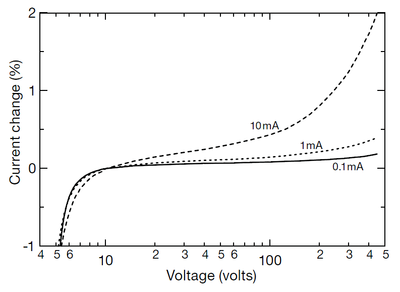
A better-suited part would be an IXCP10M45 from IXYS, in a TO-220 power package, $1.68 from Mouser. This looks like a depletion-mode MOSFET, but is called a current regulator by its manufacturer. Its performance from VDS = 5V to 450V is quite good, as the graph below shows, better than 0.1% for 0.1mA and 1.0mA current sources. At 10mA the effects of heating (4.5 watts at 450V) are becoming pretty noticeable.

There's also an IXCP10M90S available, rated at 900 volts. It costs $3 at Mouser.

So one answer to your mA source Range question could be 450 to 900 volts. :-)

__________________
Thanks, Win
Register to Reply Good Answer (Score 2)
Guru

Join Date: Jul 2010
Posts: 669
Good Answers: 176
#5
In reply to #4

Re: Milliamps Source.

05/27/2012 6:57 PM

Mr. Hill,

How did you get the text to wrap around the graphics?

Register to Reply
2
Power-User

Join Date: May 2010
Location: Cambridge, MA
Posts: 390
Good Answers: 82
#6
In reply to #5

Re: Milliamps Source.

05/28/2012 6:20 AM

That's easy. When you click the camera icon to add an image to your post, there's an alignment choice offered at the bottom: none, left and right. For the camera icon I selected left, and for the SOT-223 case, I selected right. Later, while you're still editing, you can right-click on an image, and change your choice. One useful capability is to click on the image and grab one of its corner tags and drag to resize. For example, the SOT-23 image at left was too large, compared to the SOT-223, so I made it smaller and the other bigger.

You can also drag an image up and down, to refine its placement, although sometimes that doesn't work too well, and it's often easier to delete it and re-insert at the exact spot you want. If an image is placed in the middle of a paragraph, the text will wrap around. All-in-all CR4's message-posting html editor is quite nice, I wish other forums had editing as well suited to technical posts. When it comes to images, one capability I miss is being able to create a caption and pin it to the image. Maybe someday CR4 will add that feature.

If you have multiple images, etc., in your post, it's a good idea to use Preview Comment to see how the post looks, or even go ahead and Submit the post, then bring it up in the normal way, with the rest of the posts in the thread, to see how your images stack up, etc. At that point it's useful to drag the edge of the browser to resize its window, to see how the post will look on different screen sizes. Then just Edit the post (which you're allowed to do for 15 minutes) to refine it by resizing or moving stuff around, etc.

A few minutes spent doing this stuff can make a big improvement, and it's fun to end up with an interesting attractive-looking post, even if I do say so myself!

__________________
Thanks, Win
Register to Reply Good Answer (Score 2)
Guru

Join Date: Jul 2010
Posts: 669
Good Answers: 176
#7
In reply to #6

Re: Milliamps Source.

05/30/2012 5:16 PM

Thank you for that cogent explanation.

Register to Reply
Register to Reply 7 comments

Good Answers:

These comments received enough positive votes to make them "good answers".

"Almost" Good Answers:

Check out these comments that don't yet have enough votes to be "official" good answers and, if you agree with them, vote them!
Copy to Clipboard

Users who posted comments:

Iris (2); lyn (1); PWSlack (1); redfred (1); Winfield Hill (2)

Previous in Forum: Data Transfer Within GPRS Network   Next in Forum: Shorted Turns Tester

Advertisement