The Engineer's Notebook Blog

The Engineer's Notebook

The Engineer's Notebook is a shared blog for entries that don't fit into a specific CR4 blog. Topics may range from grammar to physics and could be research or or an individual's thoughts - like you'd jot down in a well-used notebook.

Previous in Blog: Poisonous Plastics - Part One   Next in Blog: Poisonous Plastics - Part Two: Human Effects
Close
Close
Close
5 comments
Rate Comments: Nested

The Gantt Chart Turns 90

Posted October 26, 2007 3:22 PM by Steve Melito

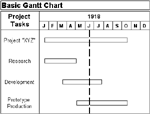
Ninety years ago, a mechanical engineer developed a horizontal bar chart that would revolutionize project management. In 1917, Henry L. Gantt designed the first Gantt chart, a graphical representation of a project's timeline, tasks, elements and dependencies. Gantt developed his project management tool during World War I, while working as a management consultant for an American shipbuilder. Later, he published his principles for Gantt charts in Organizing for Work (1919), a book which influenced generations of project managers.

Henry L. Gantt drew the first Gantt chart on a piece of graph paper. The horizontal axis represented the project's total time span. The vertical axis represented all of the project's tasks. Horizontal bars of varying lengths depicted the timing, sequence and duration of individual tasks. Longer bars indicated longer tasks, while shorter bars indicated shorter tasks. As some or all of a task was completed, Gantt shaded its bar accordingly. In this way, Gantt could provide company executives and non-managers with an understanding of project flow that did not require a complete tutorial in project management.

Traditional Gantt charts are useful, but have three significant limitations. First, because task sequencing and task relationships are not depicted, Gantt charts do not let project managers see how the delay or acceleration of one activity will affect associated activities. Second, because each task has a single start date and a single end date, Gantt charts cannot show the results of an early start or a late start for an activity. Third, because Gantt charts cannot show an activity's variability, questions about the minimum or maximum duration of a task cannot be represented.

During the twentieth century, Gantt charts were used to plan major construction projects such as the Hoover Dam (1931) and the Eisenhower Interstate Highway System (1954). They were also used in the Manhattan Project, a top-secret U.S. government program to build an atomic bomb during World War II. Although these first Gantt charts were drawn by hand, most project managers now use computer hardware and software. During the 1980s, projects schedulers began to use personal computers (PCs) and desktop applications. In the late 1990s and early 2000s, Gantt charts became a common feature of web-based applications, including collaborative groupware. They also began to use task lines to show dependencies.

Resources:

https://en.wikipedia.org/wiki/Henry_Gantt

https://en.wikipedia.org/wiki/Gantt_chart

https://www.12manage.com/methods_gantt_chart.html

Reply

Interested in this topic? By joining CR4 you can "subscribe" to
this discussion and receive notification when new comments are added.
Guru
Hobbies - CNC - New Member Hobbies - DIY Welding - New Member Engineering Fields - Electromechanical Engineering - New Member

Join Date: Aug 2007
Posts: 23647
Good Answers: 420
#1

Re: The Gantt Chart Turns 90

10/26/2007 4:19 PM

So thats how it started, Good article.

The drawbacks on Gantt Charts are correct. But a Gantt chart is only a tool no more. The drawbacks should be made up by people who are using this tool, such as the project managers, engineers and leadman who are in the meetings during presentations.

__________________
“ When people get what they want, they are often surprised when they get what they deserve " - James Wood
Reply
Guru
United States - Member - New Member Technical Fields - Technical Writing - New Member Popular Science - Weaponology - Organizer Hobbies - Target Shooting - New Member Engineering Fields - Nuclear Engineering - New Member

Join Date: Mar 2005
Posts: 2969
Good Answers: 33
#3
In reply to #1

Re: The Gantt Chart Turns 90

10/30/2007 8:23 AM

Thanks, phoenix911. And thank you for your comment!

Reply
Guru

Join Date: Sep 2007
Posts: 1817
Good Answers: 7
#2

Re: The Gantt Chart Turns 90

10/27/2007 5:50 AM

Wow, used the graphs for years and never actually thought about where it came from.

They are right about the drawbacks and it is still needed to be alert when using it. I always used to draw the horizontals with extra space between them to input correlations and consequences under the task. that way you can kind of remind yourself of important relationships without having to remember or read it from somewhere else. It does make the thing twice the size tho which in itself is a drawback. We had them on our office walls and sometimes they were full wall hight and 3 or 4 meters long

absolutely fantastic posting and enjoyed it very much. Thanks

Reply
Guru
United States - Member - New Member Technical Fields - Technical Writing - New Member Popular Science - Weaponology - Organizer Hobbies - Target Shooting - New Member Engineering Fields - Nuclear Engineering - New Member

Join Date: Mar 2005
Posts: 2969
Good Answers: 33
#4
In reply to #2

Re: The Gantt Chart Turns 90

10/30/2007 8:26 AM

Glad you enjoyed the story, case491. And thank you for sharing how you use Gantt charts. I'm still learning the basics myself, and do appreciate the "real world" information.

Reply
Guru

Join Date: Sep 2007
Posts: 1817
Good Answers: 7
#5
In reply to #4

Re: The Gantt Chart Turns 90

10/30/2007 1:33 PM

I think , but I am not sure so input requested here, that modern planning with computers may not favour the gantt chart as they are too big and cumbersome. I would imagine they have an electronic equivalent now which does things easier on small screens or laptops. If anyone out there knowing more or even uses them, I would be interested to hear, just out of interest and to keep this thread going,

which could be done in many ways,

like this one by stringing out sentences,

hey, look....donuts!

Reply
Reply to Blog Entry 5 comments
Copy to Clipboard

Users who posted comments:

case491 (2); phoenix911 (1); Steve Melito (2)

Previous in Blog: Poisonous Plastics - Part One   Next in Blog: Poisonous Plastics - Part Two: Human Effects

Advertisement