The CR4 Admin Blog Blog

The CR4 Admin Blog

The CR4 Admin Blog keeps you up-to-date with what's happening on CR4: The Engineer's Place for News and Discussion. Read about site updates, the site moderation team, and more.

Previous in Blog: Introduction to the New Moderators   Next in Blog: Meet the Moderator and Blogger: SavvyExacta
Close
Close
Close
15 comments
Rate Comments: Nested

How to Post Pictures

Posted May 09, 2010 5:01 PM by Jaxy

There are two different ways to insert pictures into your comments. You can enter them from a URL or you can use a picture that you have on your computer. This basic guide will assist you in the procedure of adding a picture to your post.

Where is the Insert Image Icon?

You will find the insert image icon in the text editor toolbar. It looks like a folder with a magnifying glass on it.

Click the button and from here you will see an "Insert/Edit Image" prompt:

There are two choices. You may insert an image that is hosted elsewhere by entering its URL. Or, you can upload an image from your own computer.


Adding a Picture from Your Computer

At the "Insert/Edit Image" prompt, click on the "Choose File" button.
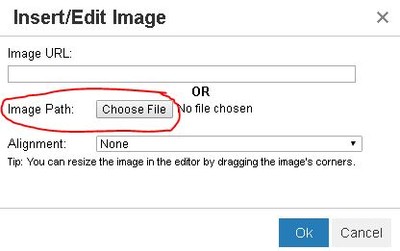
A pop-up will come up so that you can navigate to the picture of your choice. Select the picture you want and click "Open."

Next to "Image Path:" in the "Insert/Edit Image" prompt, there should be text locating your picture.


Adding an Image From a URL

Keep in mind that if you choose this method, the image displayed on CR4 will only be good as long as the site that's hosting it keeps it up. If they change it or remove it, the image in your post will appear to be broken. So the safest method is to save an image to your computer and then post it using the method mentioned above. Remember to give credit to the owner of the photo!

If you still want to use this method, go to the website that you want to pull a picture from and right click on the picture. Click "Copy Image Address" (Chrome), "Copy Image Location" (Mozilla Firefox), or "Copy Shortcut" (Internet Explorer).

Paste this link in the empty box next to "Image URL" in the "Add/Edit Image" prompt.
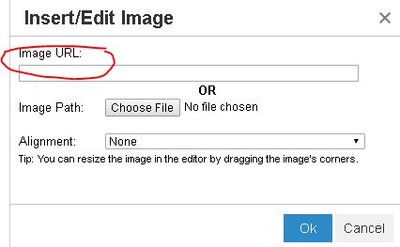
Note: When adding an image via URL, make sure that the link ends in .jpg, .gif, or other picture format or you will not get the result you desire.


Aligning Your Image

From here you can choose an alignment. An alignment "Left" or "Right" positions the picture among the text either to the left or to the right. An alignment of "None" does not allow text right next to the picture (all the pictures featured in this blog are have an alignment of "None"). After you hit submit, your picture should appear in the comment box.

Click the "Ok" button and your image will be inserted into your post!

You can read a similar tutorial started by one of our users, Sparkstation.

Reply

Interested in this topic? By joining CR4 you can "subscribe" to
this discussion and receive notification when new comments are added.
Guru
Hobbies - DIY Welding - New Member

Join Date: Feb 2007
Location: Next to the Prime Merridian (51°29'34.50"N 0°13'32.85"W)
Posts: 780
Good Answers: 1
#1

Re: How to Post Pictures

05/09/2010 6:09 PM

I hope these steps will do the tricks for me.

__________________
Making mistake is part of learning.
Reply
Guru
Popular Science - Evolution - New Member Popular Science - Weaponology - New Member

Join Date: May 2006
Location: The 'Space Coast', USA
Posts: 11119
Good Answers: 918
#2

Re: How to Post Pictures

05/09/2010 7:36 PM

It would be a real gem if CR4 could find a way for their software to support Safari instead of manually typing in all of the html formatting tags.

Reply
Guru
Hobbies - Musician - Engineering Fields - Chemical Engineering - New Member Engineering Fields - Control Engineering - New Member Engineering Fields - Instrumentation Engineering - New Member

Join Date: Jan 2007
Location: Moses Lake, WA, USA, Thulcandra - The Silent Planet (C.S. Lewis)
Posts: 4216
Good Answers: 194
#3

Re: How to Post Pictures

05/10/2010 7:30 PM

Hi Jaxy,

What about directly from your clipboard?

  1. Press Ctrl+C when your mouse is hovering over a graphic file.
  2. Place your cursor in the CR4 Message Editor and press Ctrl+V.

There's your image!

Just did it here with the Picture Insert Icon.

__________________
"Reason is not automatic. Those who deny it cannot be conquered by it. Do not count on them. Leave them alone." - Ayn Rand
Reply
Guru
United States - Member - New Member Engineering Fields - Electrical Engineering - New Member

Join Date: Jul 2008
Posts: 1149
Good Answers: 36
#5
In reply to #3

Re: How to Post Pictures

05/10/2010 10:39 PM

I didn't know you could do that. I tried doing that, but for some reason, your method isn't working correctly (they come up as broken images). What web browser are you using? I primarily use Firefox.

Reply
Guru
Hobbies - Musician - Engineering Fields - Chemical Engineering - New Member Engineering Fields - Control Engineering - New Member Engineering Fields - Instrumentation Engineering - New Member

Join Date: Jan 2007
Location: Moses Lake, WA, USA, Thulcandra - The Silent Planet (C.S. Lewis)
Posts: 4216
Good Answers: 194
#6
In reply to #5

Re: How to Post Pictures

05/10/2010 10:58 PM

Hi Jaxy,

I'm using IE 8.0.

While I am not a real big fan of Microsoft, I find that I have fewer problems with IE than other browsers like Firefox. We have Firefox at work and it has been having issues lately - won't load websites sometimes, but most of the time will. I switched to IE (unbeknownst to our IT guys) and I have no problems.

This last weekend I installed Win 7 on a new 64-bit system I put together. Out of all the operating systems Microsoft has released, this is the best. I don't want this to be a MS endorsement, but I am extremely supprised and pleased.

Mike

__________________
"Reason is not automatic. Those who deny it cannot be conquered by it. Do not count on them. Leave them alone." - Ayn Rand
Reply
Guru
Engineering Fields - Electromechanical Engineering - Technical Services Manager Canada - Member - Army brat Popular Science - Cosmology - What is Time and what is Energy? Technical Fields - Architecture - Draftsperson Hobbies - RC Aircraft - New Member

Join Date: Sep 2006
Location: Clive, Alberta, Canada
Posts: 5916
Good Answers: 204
#8
In reply to #3

Re: How to Post Pictures

05/11/2010 12:58 PM

that doesn't work for me. (or at least, it only works to copy images from the web.)

When I try to copy/paste images from my Windows Explorer, it does nothing.

any other thoughts?

Chris

Reply
Guru
Hobbies - Musician - Engineering Fields - Chemical Engineering - New Member Engineering Fields - Control Engineering - New Member Engineering Fields - Instrumentation Engineering - New Member

Join Date: Jan 2007
Location: Moses Lake, WA, USA, Thulcandra - The Silent Planet (C.S. Lewis)
Posts: 4216
Good Answers: 194
#10
In reply to #8

Re: How to Post Pictures

05/11/2010 6:27 PM

To get graphic files into the CR4 editor, you have to go the green camera route.

I just tried several ways to get around this but to no avail. There must be something about a web environment that facilitates copying directly to the CR4 editor from an image copied to your clipboard.

There must be someone out there that knows why this is, but it's not me!

__________________
"Reason is not automatic. Those who deny it cannot be conquered by it. Do not count on them. Leave them alone." - Ayn Rand
Reply
Guru

Join Date: May 2010
Location: in optimism
Posts: 4050
Good Answers: 130
#11
In reply to #10

Re: How to Post Pictures

05/12/2010 1:44 AM

It can't read the encoding clipboard uses.

I don't bother with C/P

If an image won't drag direct from a web page to editor, or I have it, or other, saved:

I just drag it to my desktop. Use browse in the camera to locate. hit submit.

It's quick, easy and saves mistakes rummaging around a directory tree - (unless your desktop looks like icon central)

Once done, it gets dragged back to it's original folder or to "Forum posted".

__________________
There is no sin except stupidity. (Oscar Wilde, Irish dramatist, novelist, & poet (1854 - 1900))
Reply Off Topic (Score 5)
Guru

Join Date: Mar 2007
Location: Etherville
Posts: 12362
Good Answers: 115
#14
In reply to #11

Re: How to Post Pictures

05/16/2010 9:29 AM

Cut 'n paste still works, though not with animations (most of the time). Codemeister is not keen on said method. Oddly. transferring stuff form within CR4 works. Not going to get into nefarious techniques for pasting pictures/animations. The fact that CR4 has stopped animated avatars should be a hint. boo-hoo. It's all just salad on the steak. Those interested might wirsh to search out some of ther excellent post by Spurky.

__________________
For sale - Signature space. Apply on self addressed postcard..
Reply
Guru
Safety - Hazmat - New Member Safety - ESD - New Member Engineering Fields - Transportation Engineering - New Member Popular Science - Evolution - New Member Technical Fields - Procurement - New Member Hobbies - Target Shooting - New Member Popular Science - Cosmology - New Member Engineering Fields - Architectural Engineering - New Member Technical Fields - Marketing/Advertising - New Member Engineering Fields - Food Process Engineering - New Member

Join Date: Dec 2005
Location: Mariposa Ca
Posts: 5800
Good Answers: 114
#15
In reply to #14

Re: How to Post Pictures

05/16/2010 10:40 AM
Reply
Guru

Join Date: Oct 2007
Location: Transcendia
Posts: 2963
Good Answers: 93
#4

Re: How to Post Pictures

05/10/2010 7:58 PM

Using the Mac I have to go to Firefox instead of Safari, which I normally use since I can go back and forth between my inbox and CR4. When I go to Firefox I have a toolbar, and can call up some of the computer stored, or digital camera photos, and post them to either CR4, or my email.

I don't post pictures very often so I'm not all that great with it.

__________________
You don't get wise because you got old, you get old because you were wise.
Reply
Guru
Popular Science - Weaponology - New Member United Kingdom - Member - New Member

Join Date: May 2007
Location: Harlow England
Posts: 16512
Good Answers: 670
#7

Re: How to Post Pictures

05/11/2010 3:47 AM

Being able to take pics straight of your PC is one of CR4's great features...
Some sites and blogs only allow you to download pics from a photo hosting site.(E.G Photobucket) This is a pain and takes a load of fiddling about. On the otherhand if my PC goes belly up (as they are wont to do eventually ) I'll still have my pics rattling round in photo bucket... (hmmm, I wonder is it a real big galvanised bucket, or a modern plastic one... )
Del

__________________
health warning: These posts may contain traces of nut.
Reply
Guru
Hobbies - DIY Welding - New Member

Join Date: Feb 2007
Location: Next to the Prime Merridian (51°29'34.50"N 0°13'32.85"W)
Posts: 780
Good Answers: 1
#9
In reply to #7

Re: How to Post Pictures

05/11/2010 2:07 PM

"hmmm, I wonder is it a real big galvanised bucket, or a modern plastic one... "

I presume it's a recyclable one to save the....

__________________
Making mistake is part of learning.
Reply
Power-User
New Zealand - Member - Member Australia - Member - Member

Join Date: Oct 2008
Location: Auckland, New Zealand
Posts: 463
Good Answers: 43
#12

Re: How to Post Pictures

05/12/2010 8:54 PM

On the same topic and it is a question previously asked and discussed but I don't think it has yet been answered.

If you paste an animated gif from a website, it retains its animation (the first one below). If you save the same image from the website and insert the image from a PC folder using the camera icon it loses its animation in the CR4 post. (The second image below) The saved file still maintains the animation in the PC folder. Any guesses ?

Reply
Guru
Safety - Hazmat - New Member Safety - ESD - New Member Engineering Fields - Transportation Engineering - New Member Popular Science - Evolution - New Member Technical Fields - Procurement - New Member Hobbies - Target Shooting - New Member Popular Science - Cosmology - New Member Engineering Fields - Architectural Engineering - New Member Technical Fields - Marketing/Advertising - New Member Engineering Fields - Food Process Engineering - New Member

Join Date: Dec 2005
Location: Mariposa Ca
Posts: 5800
Good Answers: 114
#13

Re: How to Post Pictures

05/16/2010 5:41 AM

& sometimes this

turns into

or

http://aqua.gjovaag.com/blogpics/BlueRingedOctopus.jpg

of course we could have almost the same discussion about links

& the lack of functionality on some browsers

Reply
Reply to Blog Entry 15 comments
Copy to Clipboard

Users who posted comments:

34point5 (1); Anonymous Hero (1); AussieBob (1); chrisg288 (1); Garthh (2); Isti80 (2); Jaxy (1); Kris (1); Mikerho (3); Transcendian (1); user-deleted-1105 (1)

Previous in Blog: Introduction to the New Moderators   Next in Blog: Meet the Moderator and Blogger: SavvyExacta

Advertisement